25.5. 2026 Author: Tomáš Píšek - Lead Solution Architect
When I Am an Entrepreneur with an External Accountant
We often hear the terms e-invoice and digital postman. This is understandable, as these are the terms used in the legislation and also by the Financial Administration in its webinars. However, much less is said about what accountants will actually do in practice, and what sole traders, entrepreneurs, or business owners who actually issue and send invoices will need to do.
This is understandable too. The Financial Administration cannot replace invoicing or accounting systems, nor does it know the individual agreements and services set up between entrepreneurs and external accountants. For software providers, this is a new topic, and they need time to fine-tune everything.
With Odoo, we have an advantage: electronic invoicing, including sending and receiving invoices via the Peppol network, has already been part of the system for three years. That is why we have prepared practical scenarios for you: who does what, and what is needed.
We have focused mainly on smaller entrepreneurs and sole traders who use the services of external accounting firms and who invoice other businesses or are required to receive e-invoices.
Creating and Sending an E-Invoice
Invoices Are Issued, Sent, and Booked by an External Accountant
For example, my carpenter has his process set up this way with his accountant.
What is needed:
The carpenter does not need anything. Nothing changes for him.
The accountant needs a system that supports e-invoicing and sending invoices via Peppol, such as Odoo.
By agreement, the accountant registers their system in Peppol on behalf of the client. This is done once for each such client, and the registration is approved by the entrepreneur.
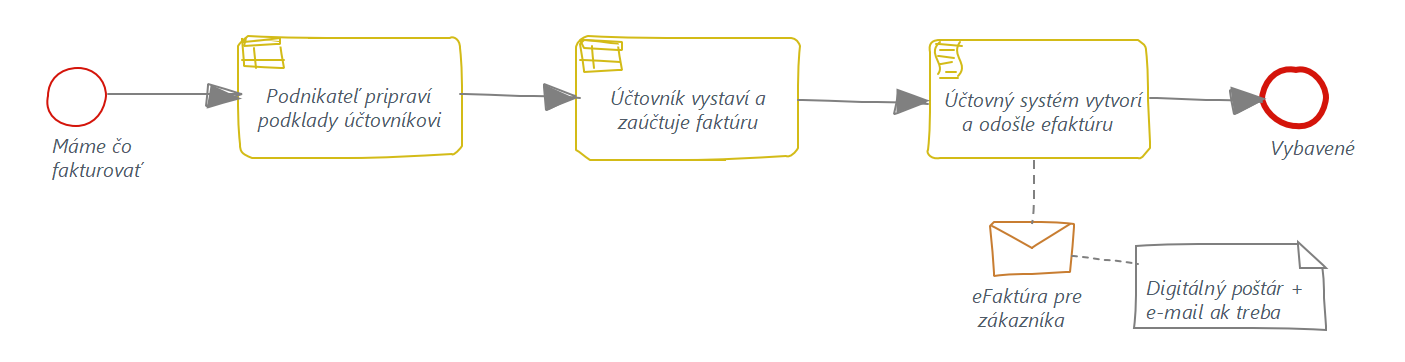
In this case, not much changes. The carpenter provides the documents needed for invoicing, and the accountant creates the invoice. If the counterparty is a company, the invoice is sent in electronic format via the digital postman, possibly also by e-mail. If the customer is a private individual, the invoice is sent by e-mail, just as it is today.
Every accounting system should be able to determine whether the counterparty is a company or a private individual.
Invoices Are Issued and Sent by the Entrepreneur, While the External Accountant Books Them
This is a common process. The entrepreneur issues an invoice and sends it to the client by e-mail. A copy, usually as a PDF, is sent to the accountant, who either retypes it or imports it into the accounting system using some tool, such as import or data extraction, and then books it.
What is needed:
The entrepreneur needs an invoicing tool that supports e-invoicing and sending invoices via the Peppol network, such as Odoo.
The entrepreneur registers in Peppol with the help of their invoicing system. This is done only once.
A copy of the invoice is handed over to the accountant, whether as the actual e-invoice, an export file, a PDF, or another agreed format.
The accountant imports the invoice into their system and books it, for example in Odoo.
The entrepreneur prepares the invoice in their invoicing software and sends it to the client electronically via Peppol, or by e-mail in the case of private individuals. The invoicing system should be able to determine whether the counterparty is a company or a private individual.
A copy of the invoice must then be provided to the accountant, who imports it into the accounting system and books it.
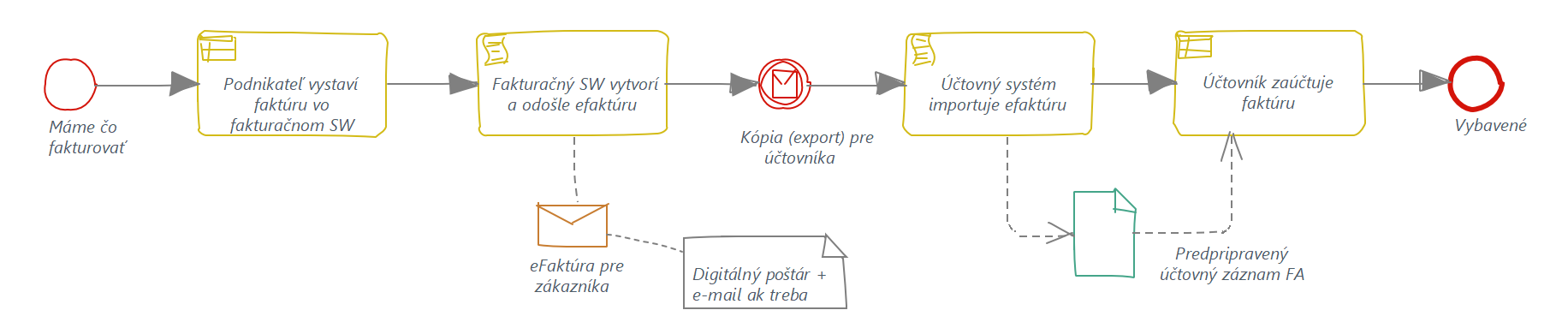
Benefits: A good accounting system can upload the e-invoice directly, either from an e-mail or from a file. This means no manual retyping and no data extraction.
Invoices Are Issued and Sent by an E-Shop, While the External Accountant Books Them
In addition to handling orders and payment processing, an e-shop also creates and sends invoices. In this sense, the e-shop works as an automatic invoicing system. The sent invoice is then exported or transferred to the accounting system for booking. This whole process usually works fully or at least partly automatically.
What is needed:
The entrepreneur’s e-shop needs to support e-invoicing and sending invoices via the Peppol network, such as Odoo. Yes, I know, I am mentioning Odoo again — but Odoo also has an e-shop.
The entrepreneur registers in Peppol with the help of their e-shop or invoicing system. This is done only once.
Invoices are transferred to the accounting system. This is usually already solved.
The accountant books the invoice.
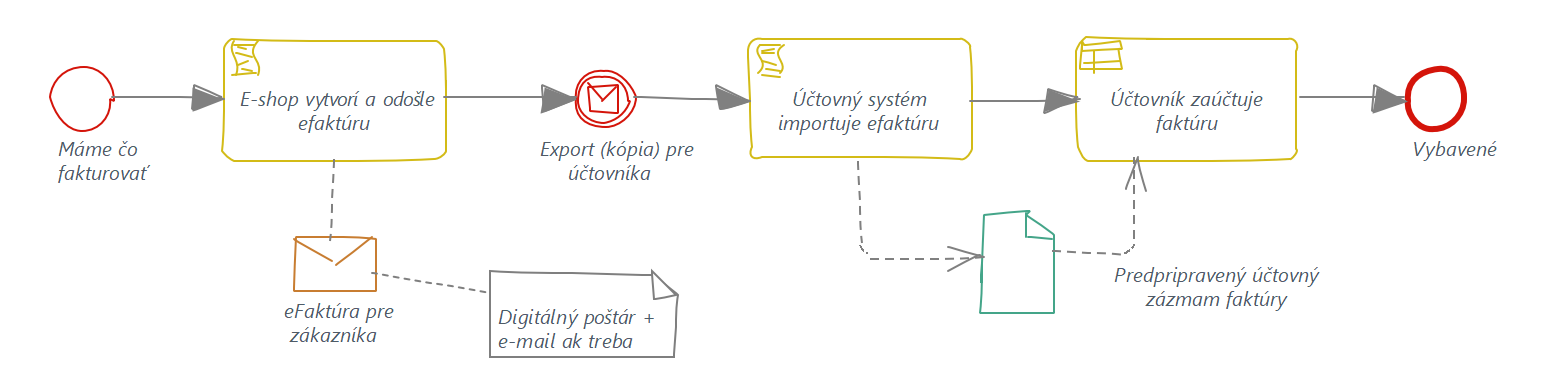
An e-shop that functions as invoicing software automatically creates the e-invoice and sends it to the client electronically via Peppol, or by e-mail in the case of private individuals. The e-shop system knows whether the counterparty is a company or a private individual.
The sent invoice is exported or transferred to the accounting system for booking, and in this respect nothing changes.
Receiving an E-Invoice
The processes for handling received invoices are usually more varied, as they often involve approval and, of course, payment. The most important question is who receives the invoices, in which system, and where they are booked.
Usually, the entrepreneur, often a non-VAT payer, receives the invoice either physically or by e-mail. Typically, they review it, pay it via a mobile banking app, and then send it to the accountant. The accountant is especially happy when it is a paper invoice, because they have to scan it and extract the data into the accounting system — or retype it manually.
First of all, it is necessary to agree on who will receive electronic invoices: the accountant or the entrepreneur. It is also necessary to agree on how invoices will be approved, if approval is needed, and how they will be paid.
The Entrepreneur Receives the E-Invoice First
What is needed:
The entrepreneur needs an invoicing system that can also receive e-invoices. Alternatively, they need a simple Peppol box, which is essentially a mailbox for e-invoices.
The Peppol box or invoicing software should be able to send a copy of the invoice to the accountant.
The entrepreneur registers in Peppol with the help of their invoicing system or Peppol box. This is done once.
It is important that the Peppol box or invoicing system can forward the e-invoice to the accountant in a format that the accounting system can automatically process, whether from a file, an e-mail, or another method.
When you think about it, almost all accounting systems should be able to load and process XML e-invoices from the Peppol network, most commonly in the BIS 3 format. So why should they not be able to process them from a file as well?
Once again, let us mention Odoo: simple uploading and conversion of an e-invoice into an accounting entry is a standard feature.
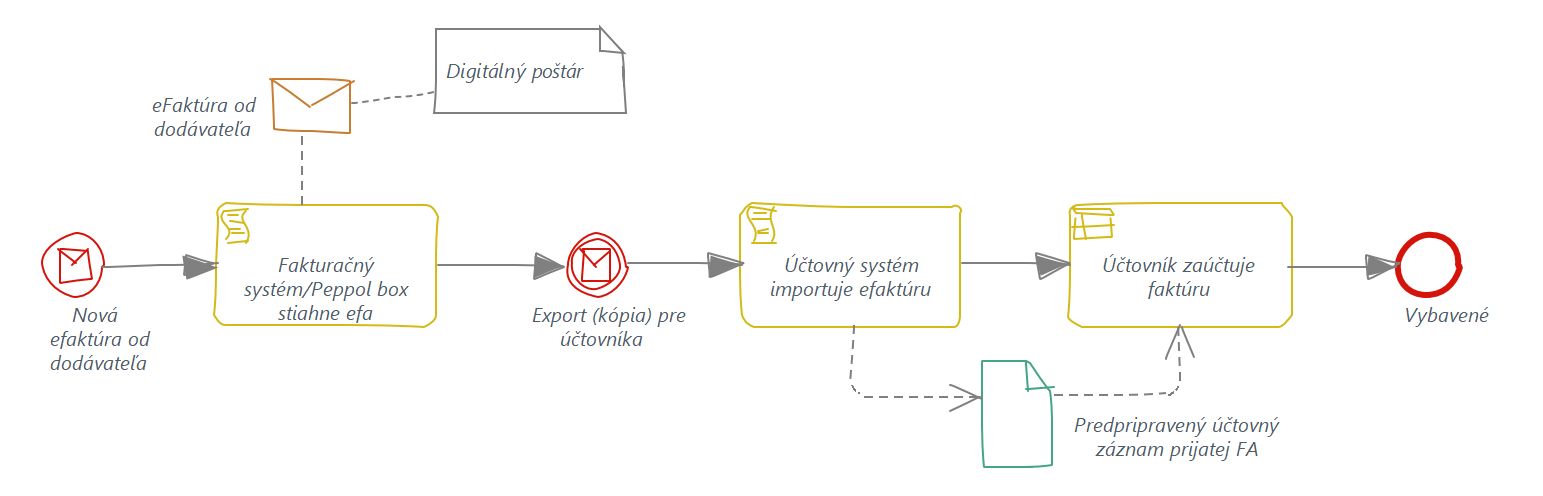
Benefits: A received invoice does not need to be retyped or processed through data extraction, which saves time. However, it is important to have a good system both for receiving invoices and for accounting.
The Accountant Receives the E-Invoice First
What is needed:
The accountant needs a system that supports e-invoicing and receiving invoices via Peppol, such as Odoo.
By agreement, the accountant registers their system in Peppol on behalf of the client. This is done once for each such client, and the registration is approved by the entrepreneur.
The accounting system should be able to send a copy of the received invoice to the entrepreneur for approval or payment, possibly even automatically.
In this case, the e-invoice is first handled by the accountant, or rather by the accounting system, which downloads it from the digital postman. The accounting system then sends a copy of the received invoice to the entrepreneur, or otherwise makes it available for approval or payment.
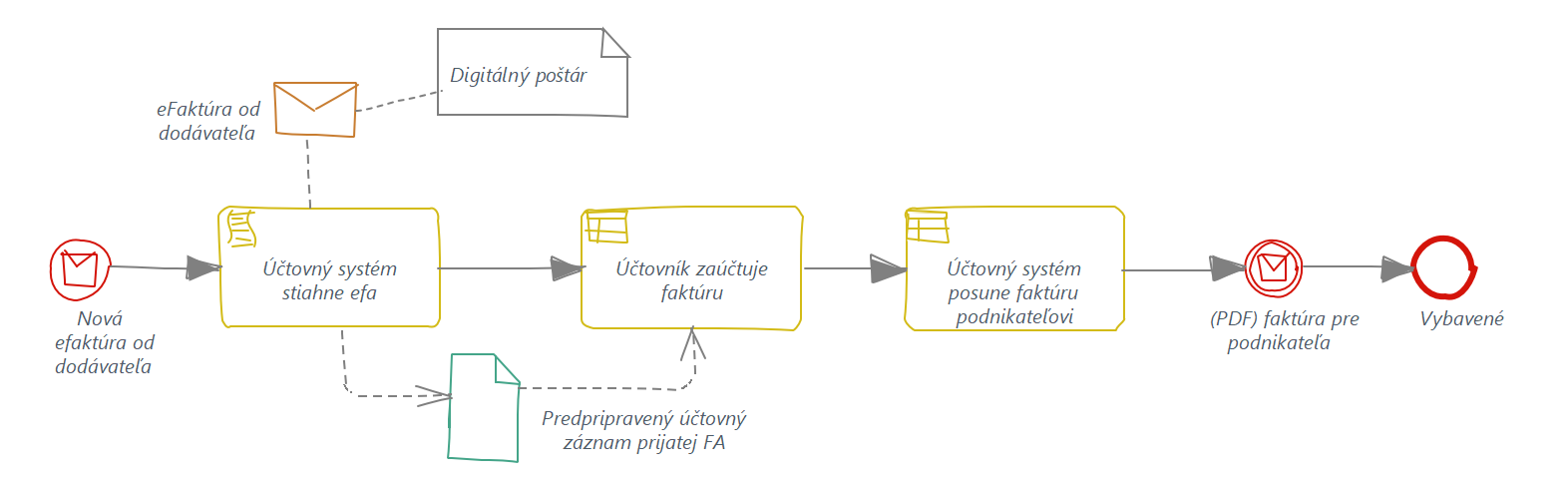
Benefits: The received invoice does not need to be retyped or processed through data extraction, which saves time. However, a good system is needed.
Disadvantages?
Entrepreneurs who currently receive invoices by e-mail will need a digital mailbox for e-invoices, or even a full invoicing system. There is no way around this.
The good news is that this is neither complicated nor expensive. For sole traders who receive only a few invoices per month, Peppol boxes, including features for accountants, are available free of charge.
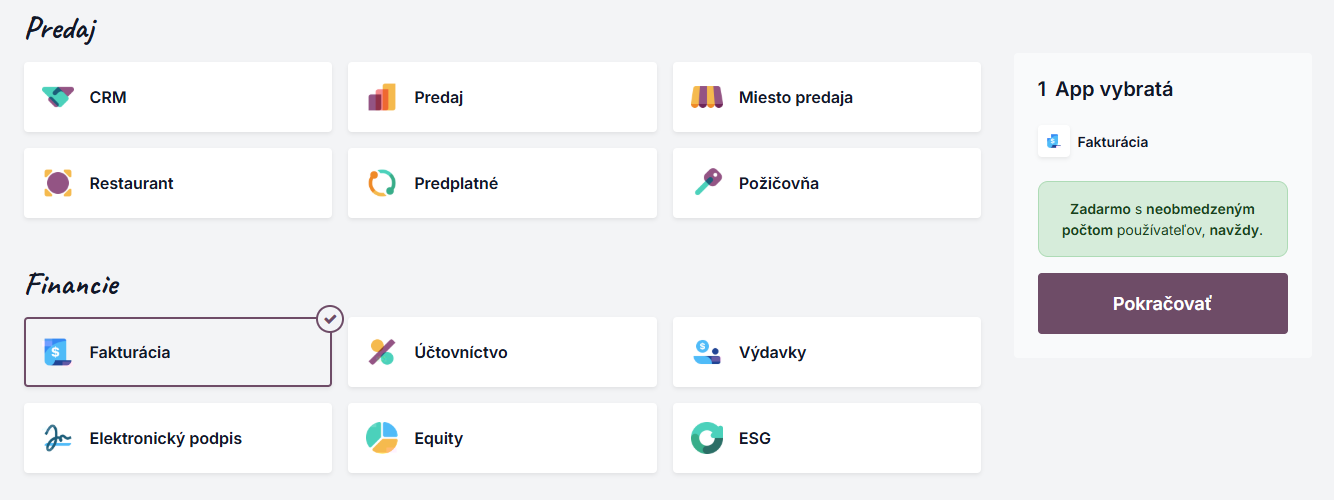
Alternatively, you can use Odoo Online under the “one app free” offer.
The second disadvantage is more of a risk. The supplier of your system must ensure support for e-invoicing and integration with the digital postman. This may sometimes be a problem, so ask your software providers to make sure they handle it in time — or so that you still have enough time to switch to another solution.
Benefits?
I will leave aside security and the certainty of delivery, because most of us do not see these as important, which is a pity.
The benefits are mainly for accountants. With a good system, invoices no longer need to be retyped, scanned, or processed through data extraction. Invoices also do not need to be printed for archiving purposes, because the electronic version is considered the original. It should be stored in the accounting system or another appropriate system.
Of course, this also means that backups become even more important.
Where Did the Digital Postman Go?
In the processes described above, the digital postman is barely mentioned, only in passing. Entrepreneurs and accountants primarily need a tool for invoicing or accounting, not the digital postman itself.
The digital postman is something that works in the background, and an ordinary user does not even need to know much about it. What matters is that the invoicing tool can create an e-invoice and send it through a certified digital postman.
Do not look for a Peppol digital postman. Look for an end-to-end solution.
And What If...?
You will certainly think of other scenarios, variations, or requirements.
Ask the providers of your invoicing and accounting systems how they will support e-invoicing. Every software solution has different options, workflows, and something unique that other systems may not have.
We will be happy to answer your questions about e-invoicing in Odoo.
Need help with e-invoicing in Odoo?
Let us show you how Odoo can simplify the entire process — from issuing Invoices to receiving and accounting for them.